The Five Signals Your Holiday Email Deliverability Is About to Tank… and How to Fix It Fast
Every marketer goes into November with their org whispering the same lie in their ear… “We’ll just send a little more, and it’ll be fine.”
You and I both know the truth.
You press send and instantly regret it. Your jaw tightens and you feel that little pulse behind your eyes, because inboxes are already drowning in look-alike offers, competition is spiking, and subscribers are swatting emails away like mosquitos at a summer BBQ.
But sure… “We’ll make it up in volume,” right?
Because nothing bad has ever happened when a stressed-out org decides brute-force sending is the answer.
Meanwhile, mailbox providers are getting even better at sniffing out the difference between “wanted” mail and “we panicked and hit send.”
But this post isn’t about panic. Or drama. Or to remind you that you need a full body massage like, stat (even though you do).
It’s about what you can do right now… a little over a week away from Black Friday… to keep your program steady.
Because email programs don’t suddenly start to weeble-wobble in Q4 due to “holiday crackdowns.” It’s because humans behave differently at the same time senders get more aggressive.
So before we talk about the early red flags to watch for, let’s talk about how to avoid digging your own deliverability grave in the first place.
Before We Even Get to the Warning Signs…
Think of this as preventative maintenance. You won’t need to repair trust in January if you avoid breaking it in the first place. Here are a few ways to do that.
💌 Give people a clear way to opt down or pause promotions.
Respecting attention is one of the best deliverability tools you have. Not because it “helps your IP,” but because disengagement happens long before unsubscribes… and it’s one of the fastest ways to tank performance.
So, if they’re not feelin’ it this season, let ‘em snooze like Rumpelstiltskin and meet you again in 2026.
💌 Let people self-select through clear subject lines.
Gift guides, deal alerts, wishlist reminders… all of ‘em are useless if the email doesn’t match what they hoped to find.
Clarity beats curiosity and hype, especially right now. So, let Uncle Fred know when the winter flannels are on sale and let the moms know when the mom jeans are 40% off. Everybody wins.
💌 Avoid fake urgency like it’s spoiled shrimp.
When your “Black Friday sale ends tonight!!” actually means a week from Friday after three extensions, people stop believing you. And when they stop believing you, they stop opening… and sometimes start marking you as spam. So, don’t turn every send into a five-alarm fire.
💌 Keep it real.
People can smell desperation a mile away. If your “up to 50% off” is really just “50% off the stinky candles nobody wanted last year” and everything else is just the regular sale you’ve been having, fix the offer or fix the framing… otherwise you end up as a cautionary tale on social media.
Because people don’t like feeling tricked, and they despise having their time wasted. Nothing tanks brand loyalty (and sender reputation) faster than disappointment (except for anger, that is).
Alright. Groundwork set. Now let’s talk about the red flags at this stage in the game that tell you your holiday sending might be headed for a cliff.
The Five Signs You’re About to Tank Your Holiday Deliverability
Here’s the thing: if you’re widening your targeting to include riskier and/or less active segments, of course your volume’s gonna go up and your open and click rates are gonna drop. That’s to be expected… because math.
So, do a friggin’ happy dance if you’re not seeing:
Open rate trending down
Click rate trending down
Hard bounce rates up slightly, particularly if list hygiene hasn’t kept up
Spam complaints from long-time subscribers who haven’t heard from you in a while
But there are other patterns that note actual problems with deliverability that aren't an expected result of wider targeting.
Quick note as we work through these: While I’d normally tell you to review your last 3–5 sends, most people’s cadences are about as stable as a folding table at a toddler’s birthday party right now. So instead of cherry-picking a handful of wildly different campaigns, look back over roughly the past 10 days.
The goal is simple: measure your performance against current inbox conditions, not whatever was happening before you started emailing more often than usual.
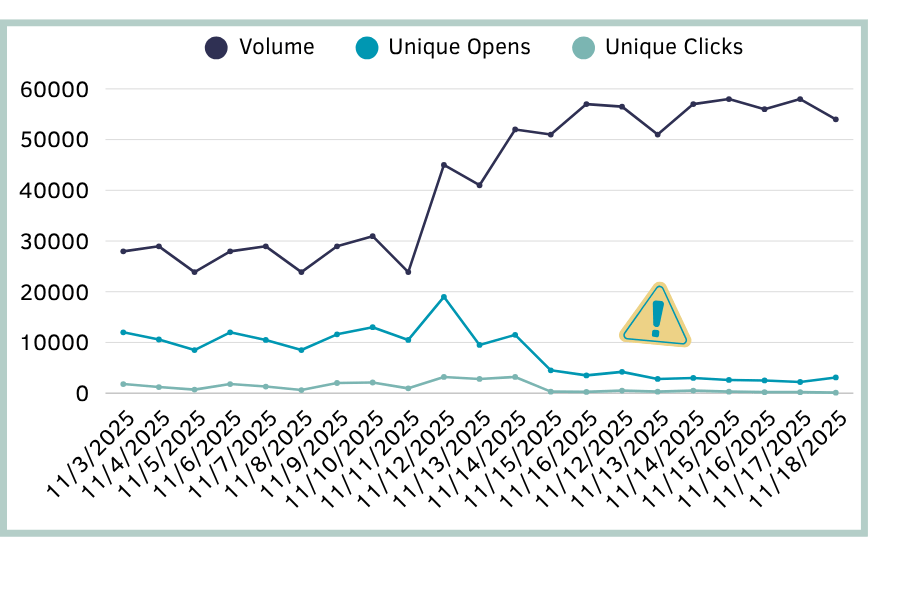
1. Absolute Opens or Clicks Are Dropping (Counts, Not Rates)
If your list got bigger but your total opens or clicks are lower, that’s not “holiday noise.” That usually means less mail is hitting the inbox… including for your most active subscribers.
What to check:
Compare the last several days of sends:
total delivered
total opens
total clicks
If totals are down even though you mailed more people, that’s a red flag.
2. Clicks Are Dropping Faster Than Opens
If opens look “fine” but clicks have tanked, that’s people skimming, deleting, not acting. They’re potentially interested, but what you’re selling isn’t compelling enough for them to take the next step.
Filters treat this as “low value mail.”
What to check:
Click-to-open rate (CTOR) trend for the last 10 days.
As Jeanne Jennings wrote for the OI Metrics Project, “CTOR gives you a good, clean read on how effective the body of your email is at driving clicks. It adjusts for any variance in open rate between email messages when you are comparing one to another (or one to many).”
3. One Mailbox Provider Is Dropping Faster Than the Others
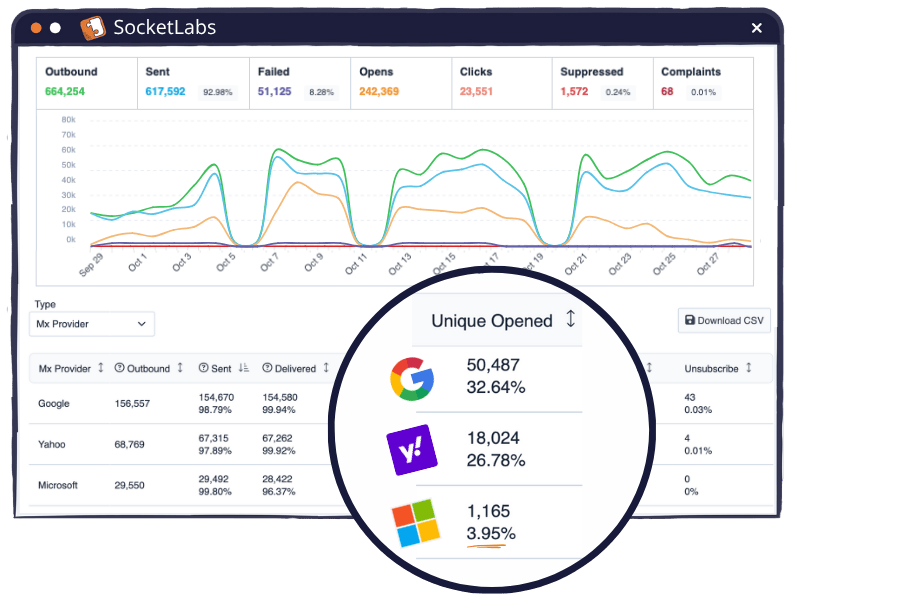
We’re not talkin’ overall engagement here... it’s about one domain dropping off while the others chug along just fine. If Gmail is still pulling healthy opens, Yahoo’s hanging in there, and Microsoft suddenly flatlines at under 4%, that’s not a “bad campaign.” That’s a Microsoft-specific filtering issue.
What to check:
Don’t rely on your aggregate open rate… it’ll hide problems like this. Break things out by provider so you can see who’s holding steady (Gmail, Yahoo) and who’s sending you to the spam folder.
Some ESPs surface this in the dashboard like you see here. Others bury it in an export you have to dig for… but it’s worth the detour. This is usually the earliest indicator of domain-specific inboxing problems.
If you want the step-by-step version of how to stabilize domain-level drops, I covered that in my piece on How to Diagnose and Recover from Deliverability Disasters.
4. Unsubscribes or Complaints Show a Spike… or Flatline When They Shouldn’t
Yes, rising complaints are bad… everyone knows that. And BFCM competition means people get irritated faster.
What most senders don’t realize is that zero complaints can be just as concerning, depending on what else is happening.
There are a few patterns worth paying attention to:
1️⃣ Complaints used to exist, but suddenly drop to zero.
This is the quiet slide. No big blow-up, no obvious trigger… just a slow deterioration that eventually pushes your mail out of sight. Check your opens. If they declined alongside the complaints, you’re likely landing in spam. People can’t complain about mail that’s already been filtered out.
2️⃣ Complaints have always been zero and opens are low.
That’s the early-stage version of the same problem. Your messages were never visible enough for people to react — positively or negatively. Out of sight, out of mind. It’s a sign of weak inbox placement or over-mailing into a disengaged audience, and it typically precedes more noticeable filtering issues.
3️⃣ A complaint spike followed by a “zero complaint” stretch.
This is the textbook case of cause-and-effect for getting too aggressive. You upset a chunk of your audience (or hit a risky segment), complaints surge, and filters react to the spike by slamming the door on your inbox placement. The “zero complaint” period that follows isn’t healthy… it’s the result of your mail being invisible.
What to check:
Overall complaint-rate trendline
Unsubscribe rate
Domain-level complaints (if you can get them… absolute gold)
And unlike some of the other signals where we’re zooming in on the past 10-ish days, complaint behavior needs a longer runway. Look back several months so you know what “normal” looks like for your program. Otherwise you’ll miss the subtle domain-level patterns that always show up before the real trouble starts.
And remember… during BFCM, people get irritated faster. Even a small uptick is telling you something. So, act before it becomes a trend.
Keep in mind that while unsubscribes don’t hurt your deliverability, they’re a really strong indication that what you’re sending is pushing people too far. In terms of monitoring, treat them similarly: because if unsubs are high, it’s likely that at least some people on your list are marking your mail as spam as well.
If complaints are your current nightmare, I did a full deep-dive on the SocketLabs blog with Alison Gootee, Will Boyd, and Marcus Biel. Highly recommend if you want the long-form version of this conversation.
5. Delivery Delays or Slow Inboxing at One Domain
This one’s subtle, and most senders miss it because they’re not watching delivery in real time. But slowness — delayed delivery, slow inboxing, trickle-through sending — almost always means one thing: a mailbox provider is throttling your mail because they don’t trust your recent sending behavior.
And just like with domain-level open drops, you’re usually seeing this at one provider, not all of them.
Here are the patterns to look for:
1️⃣ Mail hits your test accounts slowly, or one provider lags behind the others.
If Gmail results load instantly but Microsoft takes its sweet time (or vice versa), that’s the provider intentionally slowing down how much mail they’ll accept. It’s a soft reputation signal: “We’ll take this… eventually… but we’re not thrilled about it. Get your act together.”
2️⃣ Your ESP shows more “deferred” statuses than usual.
Normally, legitimate mail goes straight from “Sent” to “Delivered” with very little gap in between. When you see deliveries creeping upward slowly within your ESP reporting instead of the usual all-at-once jump, that’s throttling. The provider is deliberately spacing out your inbound attempts to protect their users.
3️⃣ Messages fail on the first try, then sit in retry before finally delivering (or bouncing).
A soft bounce like “try again later” doesn’t mean the address is bad… it means the provider isn’t ready to accept your message. Your ESP will retry a few times, and during that window you’ll see mail marked as “Sent” but not “Delivered.” If all of the retry attempts fail, then it shows up as a bounce.
What to check:
Delivery status logs (look for “deferred,” “4xx,” “try again later”)
Time-to-deliver across Gmail vs Yahoo vs Microsoft, etc. (your test accounts help here)
Inbox placement tool results that load unevenly by provider
Your last 5–10 sends for any rising pattern of slow delivery
If this one made you wince, I’ve got a full breakdown on deferrals over on the SocketLabs blog that should help you make it make sense.
What to Do About It (…Without Tanking Your BFCM Revenue)
You don’t need a full program overhaul. You just need to stop pouring lighter fluid on your flickering flame. Here’s how to stabilize things without stalling momentum.
1. Cut the Noise Before You Cut the List
If irritation is rising (or performance is wobbling), the worst response is “send more.” So start by removing the clutter.
Cut non-essential sends for the next 3–5 days.
Pause anything that doesn’t have a clear value prop tied to your BFCM goals.
Kill or pause one “meh” or business-as-usual send that’s adding noise or splitting subscriber attention.
Merge two promos or turn one into a reminder that only goes to engaged users.
Resist the urge to “make it up in volume.” It never works the way you hope it will.
Think of it this way: If subscribers feel bombarded, mailbox providers feel bombarded. And they often behave like parents (or pet owners) protecting their kids (or fur babies). Lowering background noise buys you breathing room to keep on keepin’ on with your BFCM goals.
2. Tighten Targeting (Especially Where Things Are Slipping)
If any domain is looking cranky (or engagement is sliding), don’t keep sending to the same broad audience and praying for a turnaround. Narrow it.
Focus on your highest-intent subscribers (recent activity on-site, recent clicks, recent purchases (especially outside your current BFCM offer).
Stop widening until your metrics stabilize.
If only one provider is wobbling, reduce volume for that provider specifically (assuming your ESP lets you do it safely).
Pull back on recent buyers - they’re satisfied, and less likely to engage if they’ve already done the thing you wanted them to do.
Run a “high-intent only” send to help reset engagement before going wide again. Prove to mailbox providers that your mail matters to a larger portion of your audience.
Rule of thumb:
When in doubt, go narrower. No one regrets sending to people who actually want to hear from them. But you will regret having mail to those folks go to the spam folder because you tried re-engaging folks who couldn’t give a hoot about you (or don’t even remember you exist).
3. Fix the Message, Not Just the List
A lot of “deliverability issues” are actually clarity issues… or trust issues. If people are opening inconsistently or not acting, fix what they’re reacting to.
Align mismatched or misleading subject lines and offers.
Make sure your subject line + preheader = exactly what’s inside.
Stop fake urgency. Filters hate it, and people hate it more.
Make the main CTA unmistakably obvious so it’s easier to follow… don’t bury it under fluff.
Make the offer clearer: who it’s for, why now, what they actually get.
Your message doesn’t need to be louder. It needs to be clearer. Over-deliver and under-promise; not the other way around.
4. Adjust Frequency Without Killing Momentum
You don’t have to choose between “spammy” and “silent.” You just have to be deliberate about how often you show up and who gets what.
Pull back slightly on cadence for the segments or domains that are wobbling.
Send smarter: tighter segments, higher intent, and a clearer job for each email.
Use frequency controls or let people opt down if they’re overwhelmed.
Keep your sends focused on high-intent “jobs”: gift guides, last-minute, category-specific. Avoid having a scattershot of every promo idea floating around your team’s Slack channel.
For stable, high-engagement segments, hold steady. For the rest, ease off the gas.
Good frequency isn’t about sending less… it’s about sending with purpose.
Putting It 🎶 All Together Now 🎶
No single red flag means your program is doomed. But if you spot any of the five early signs we’ve run through today — especially if you see more than one at the same time — these adjustments can help you stabilize things before the big day(s) ahead.
But wait! Before you go, let's pause to...

“If you weren’t the one sending these emails, would you open them right now?
Would you welcome the frequency… or mute it?
What’s the one send you’d cut if you were choosing with your subscriber hat on?
Then reach out and tell me: Which of the five signals is tapping you on the shoulder right now?”
Your answers will help me help you by creating content’s that actually helpful. I can’t do that without your feedback. Thanks for your help.
A Final Word on Trust
We talk a lot about trust with mailbox providers. But trust with humans is what really drives deliverability… especially in this AI-everything dystopia we seem to have entered.
You don’t win holiday deliverability by sending harder.
You win it by not sending recklessly.
Right now, people are already side-eyeing every subject line because scams and AI-generated nonsense are everywhere. The brands that stand out are the ones that show restraint, respect attention, and don’t play fast and loose with urgency or frequency.
When people trust you, they behave in ways that signal trust to mailbox providers.
Protect one, and you protect the other.
Break it… and you’ll spend January rebuilding that trust one apology email at a time… if your emails even land somewhere they can see them, that is.
Let’s not do that. Your future self will thank you for resisting the panic sends.
💌 Before You Go…
A little something for the senders choosing calm over chaos this season.

Because not everyone wants to contribute to the tidal wave of “just one more send.”
If you’re the sender who knows better… this tee is for you. 💌
Wear it proudly. Or ironically. Sender’s choice.
* And if you want a laugh, a wink, or a design that says “I care about deliverability more than is socially acceptable,” check out the rest of the shop.
Want more content like this in your life? Yeahhhh you do.
Send It Right is a blog and weekly(ish) newsletter for marketers and email practitioners who want to reach the inboxes (and hearts) of email recipients. Join 1,275+ other email nerds in subscribing to get the next lesson directly in your inbox. 💌
